Title: City-Builder Part 1 — Where are the separate road pieces?
Hello!
I am starting to build City-Builder Part 1, but I am confused about the road assembly instructions.
The instructions say that the roads must be cut out separately, glued onto strips of cardboard (or corrugated cardboard) no wider than 18–19 mm, and then placed onto the map bases.
However, in the City Map 1 PDF, the roads are already printed as part of the maps. I cannot find a separate sheet containing the roads to cut out.
If I cut the roads out of the map sheets, the maps will be divided into many separate pieces.
Could you please explain which PDF contains the separate roads, or how exactly we are supposed to cut them out without damaging the map?
Thank you for your help!
Title: City-Builder Part 1 — Where are the separate road pieces?
Hello!
I am starting to build City-Builder Part 1, but I am confused about the road assembly instructions.
The instructions say that the roads must be cut out separately, glued onto strips of cardboard (or corrugated cardboard) no wider than 18–19 mm, and then placed onto the map bases.
However, in the City Map 1 PDF, the roads are already printed as part of the maps. I cannot find a separate sheet containing the roads to cut out.
If I cut the roads out of the map sheets, the maps will be divided into many separate pieces.
Could you please explain which PDF contains the separate roads, or how exactly we are supposed to cut them out without damaging the map?
Title: City-Builder Part 1 — Where are the separate road pieces?
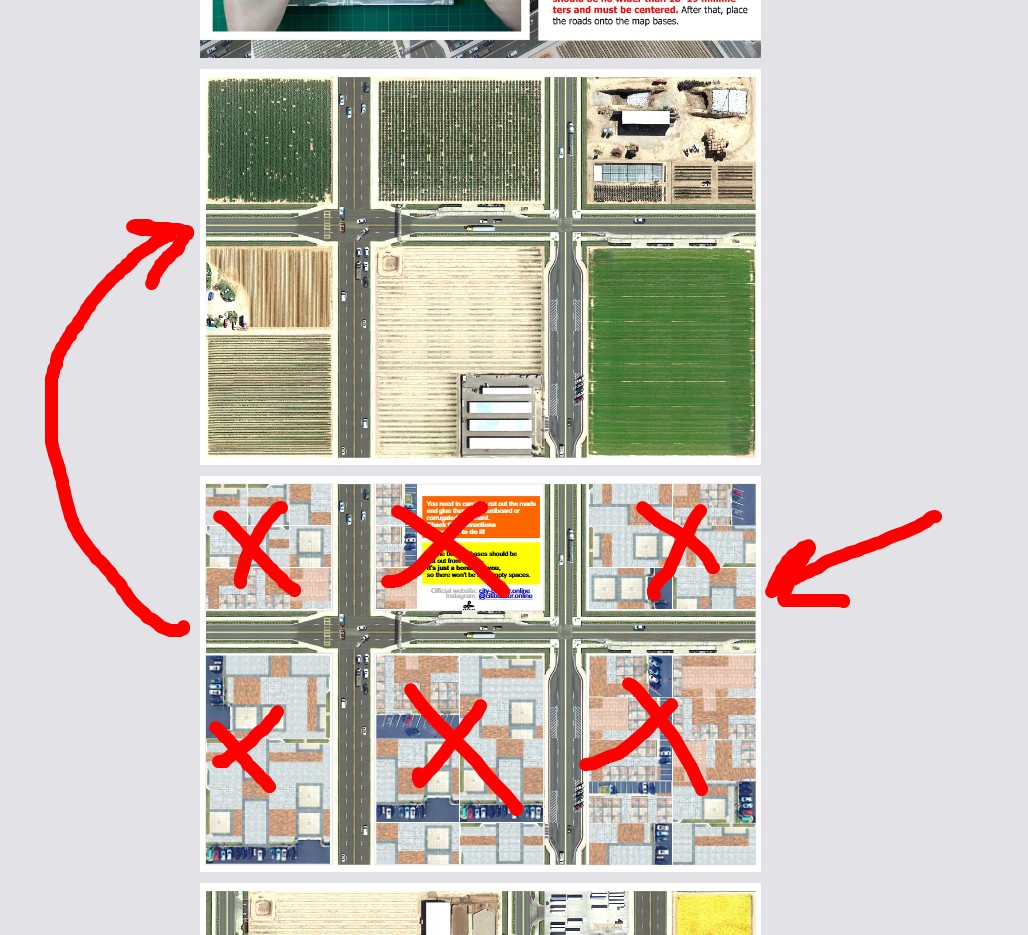
Hello! It's actually very simple! Right after the map with the fields, there's a map for cutting out. It's shown in the picture. As for those other bases that might seem a bit confusing, they're just a bonus in case you want to place your buildings on different ground textures. Is it clearer now? :)
Franco:
Title: City-Builder Part 1 — Where are the separate road pieces?
Hello! It's actually very simple! Right after the map with the fields, there's a map for cutting out. It's shown in the picture. As for those other bases that might seem a bit confusing, they're just a bonus in case you want to place your buildings on different ground textures. Is it clearer now? :)
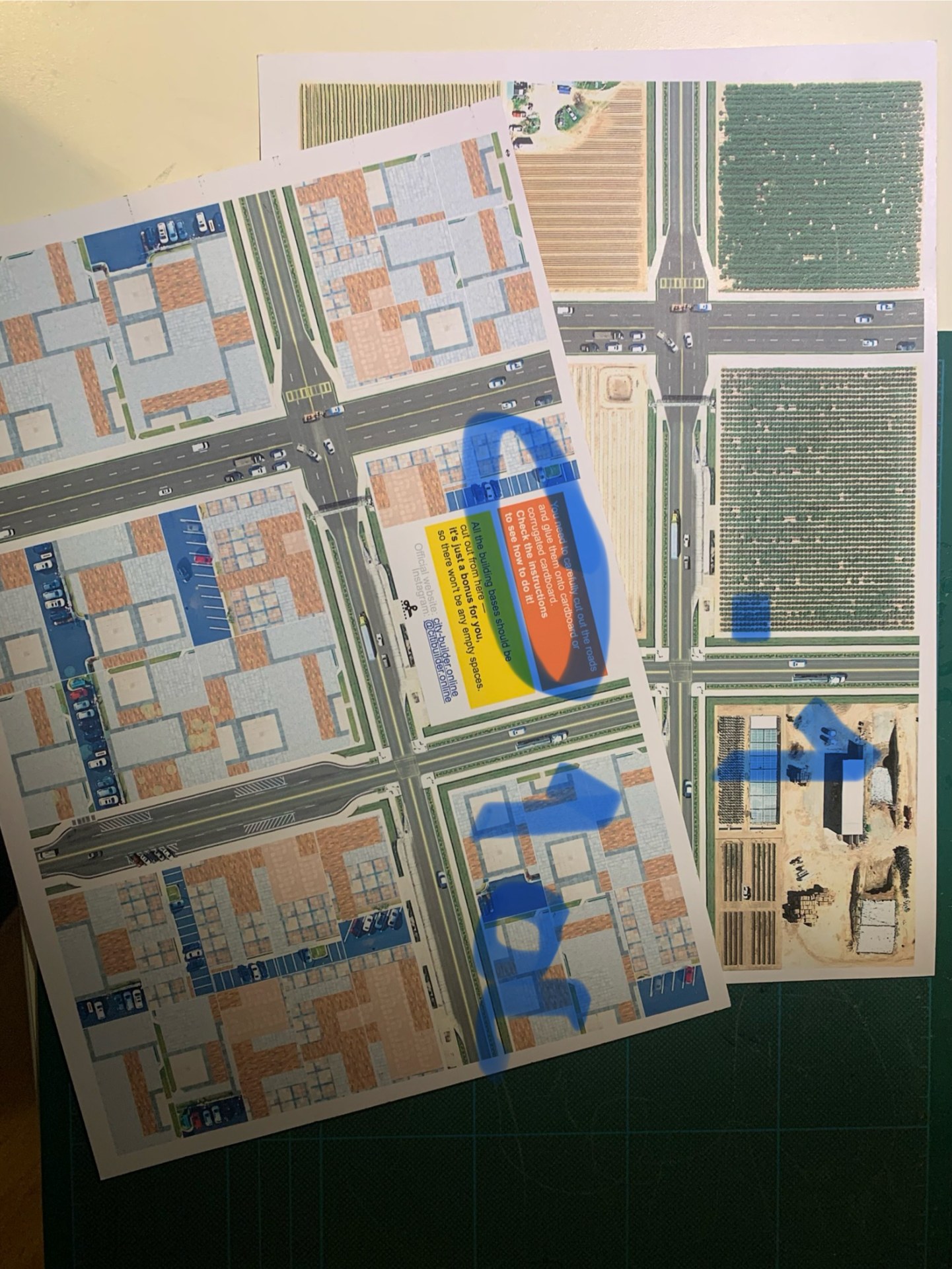
ok, grazie! Ma avrei ancora alcuni dei dubbi...1) avendo incollato le mappe sul cartoni da mm 2, non capisco perchè ritagliare le strade, per incollarle là dove sono già illustrate! Inoltre, incollare anche le strade sul cartone da 2 mm comporterà un loro aumento di spessore, rendendole più alte dei marciapiedi. Per quale scopo?2) se nell'immagine della prima mappa, incollo (o ritaglio e incollo?) 1a su 1, il disegno di 1 viene nascosto! Allora perchè esiste? E perchè vedo un campo di grano oppure un bel prato verde, se poi lo dovrò coprire, incollandoci sopra degli edifici?3) nella parte cerchiata dell'immagine, dice di verificare le istruzioni. Ma non spono riuscito a trovare istruzioni da nessuna parte4) Esiste un criterio per decidere dove poggiare un qualche edificio?Grazie!
ok, grazie! Ma avrei ancora alcuni dei dubbi...1) avendo incollato le mappe sul cartoni da mm 2, non capisco perchè ritagliare le strade, per incollarle là dove sono già illustrate! Inoltre, incollare anche le strade sul cartone da 2 mm comporterà un loro aumento di spessore, rendendole più alte dei marciapiedi. Per quale scopo?2) se nell'immagine della prima mappa, incollo (o ritaglio e incollo?) 1a su 1, il disegno di 1 viene nascosto! Allora perchè esiste? E perchè vedo un campo di grano oppure un bel prato verde, se poi lo dovrò coprire, incollandoci sopra degli edifici?3) nella parte cerchiata dell'immagine, dice di verificare le istruzioni. Ma non spono riuscito a trovare istruzioni da nessuna parte4) Esiste un criterio per decidere dove poggiare un qualche edificio?Grazie!
ok, grazie! Ma avrei ancora alcuni dei dubbi...1) avendo incollato le mappe sul cartoni da mm 2, non capisco perchè ritagliare le strade, per incollarle là dove sono già illustrate! Inoltre, incollare anche le strade sul cartone da 2 mm comporterà un loro aumento di spessore, rendendole più alte dei marciapiedi. Per quale scopo?2) se nell'immagine della prima mappa, incollo (o ritaglio e incollo?) 1a su 1, il disegno di 1 viene nascosto! Allora perchè esiste? E perchè vedo un campo di grano oppure un bel prato verde, se poi lo dovrò coprire, incollandoci sopra degli edifici?3) nella parte cerchiata dell'immagine, dice di verificare le istruzioni. Ma non spono riuscito a trovare istruzioni da nessuna parte4) Esiste un criterio per decidere dove poggiare un qualche edificio?Grazie!
🇮🇹 Italiano
È tutto molto semplice!
Sì, le strade diventeranno più spesse, ma anche le basi degli edifici verranno incollate sul cartone. In questo modo, gli edifici si inseriranno nelle apposite sedi, impedendo loro di spostarsi se urtate accidentalmente la mappa.
Se non spostate gli edifici, ma li incollate definitivamente alla superficie della mappa, allora è vero: le texture dei campi e degli altri elementi non fanno per voi! :) Ma altrimenti sono molto belle anche quando non c'è ancora nessun edificio. Dopotutto, l'idea principale del progetto è proprio quella di poter disporre gli edifici come si vuole, ogni volta in modo diverso!
La seconda pagina è proprio l'istruzione visiva.
No, no!!!!! Siete voi i creatori della vostra città e potete costruirla come preferite!!! Date un'occhiata al mio Instagram per vedere come mi diverto a giocare con gli edifici. Forse così tutto sarà ancora più chiaro! https://www.instagram.com/citibuilder.online/
🇬🇧 English
It's very simple!
Yes, the roads will become thicker, but you'll also glue the building bases onto cardboard. This way, the buildings will fit into the slots, preventing them from moving if you accidentally bump into the map.
If you don't rearrange your buildings and instead glue them permanently to the entire map surface, then yes, the field textures and other details probably aren't for you! :) But otherwise, they look beautiful even when there are no buildings on them yet. After all, the whole idea of this project is to let you arrange your buildings however you like, differently every time!
The second page is actually the visual instruction guide.
No, no!!!!! You're the creator of your own city, and you can build it however you want!!! Take a look at my Instagram to see how I play around with my buildings. Maybe that will make everything even clearer! https://www.instagram.com/citibuilder.online/
Franco:
ok, grazie! Ma avrei ancora alcuni dei dubbi...1) avendo incollato le mappe sul cartoni da mm 2, non capisco perchè ritagliare le strade, per incollarle là dove sono già illustrate! Inoltre, incollare anche le strade sul cartone da 2 mm comporterà un loro aumento di spessore, rendendole più alte dei marciapiedi. Per quale scopo?2) se nell'immagine della prima mappa, incollo (o ritaglio e incollo?) 1a su 1, il disegno di 1 viene nascosto! Allora perchè esiste? E perchè vedo un campo di grano oppure un bel prato verde, se poi lo dovrò coprire, incollandoci sopra degli edifici?3) nella parte cerchiata dell'immagine, dice di verificare le istruzioni. Ma non spono riuscito a trovare istruzioni da nessuna parte4) Esiste un criterio per decidere dove poggiare un qualche edificio?Grazie!
🇮🇹 Italiano
È tutto molto semplice!
Sì, le strade diventeranno più spesse, ma anche le basi degli edifici verranno incollate sul cartone. In questo modo, gli edifici si inseriranno nelle apposite sedi, impedendo loro di spostarsi se urtate accidentalmente la mappa.
Se non spostate gli edifici, ma li incollate definitivamente alla superficie della mappa, allora è vero: le texture dei campi e degli altri elementi non fanno per voi! :) Ma altrimenti sono molto belle anche quando non c'è ancora nessun edificio. Dopotutto, l'idea principale del progetto è proprio quella di poter disporre gli edifici come si vuole, ogni volta in modo diverso!
La seconda pagina è proprio l'istruzione visiva.
No, no!!!!! Siete voi i creatori della vostra città e potete costruirla come preferite!!! Date un'occhiata al mio Instagram per vedere come mi diverto a giocare con gli edifici. Forse così tutto sarà ancora più chiaro! https://www.instagram.com/citibuilder.online/
🇬🇧 English
It's very simple!
Yes, the roads will become thicker, but you'll also glue the building bases onto cardboard. This way, the buildings will fit into the slots, preventing them from moving if you accidentally bump into the map.
If you don't rearrange your buildings and instead glue them permanently to the entire map surface, then yes, the field textures and other details probably aren't for you! :) But otherwise, they look beautiful even when there are no buildings on them yet. After all, the whole idea of this project is to let you arrange your buildings however you like, differently every time!
The second page is actually the visual instruction guide.
No, no!!!!! You're the creator of your own city, and you can build it however you want!!! Take a look at my Instagram to see how I play around with my buildings. Maybe that will make everything even clearer! https://www.instagram.com/citibuilder.online/